
 By
By 
Designers today work under tight deadlines. Whether you’re creating brand assets, UI elements, or marketing visuals, speed and consistency matter just as much as creativity.
Yet many designers still lose hours fixing blurry images, resizing assets, or recreating visuals from scratch—all because of format limitations.
This is where vector conversion becomes a powerful productivity tool.
TL;DR / Quick Answer
A PNG to SVG File Converter helps designers save time by turning fixed-size images into flexible vectors that scale, edit, and adapt instantly.
Why Time Efficiency Matters in PNG to SVG File Converter
Design is no longer a one-size, one-platform task. A single asset may be needed for:
- Websites
- Mobile apps
- Social media
- Print materials
- Presentations
Each platform requires different dimensions and resolutions. When assets are not flexible, designers spend unnecessary time resizing, exporting, and correcting quality issues. Over time, these small tasks add up to major productivity losses.
The Hidden Time Costs of Working with PNG Files
PNG files are raster-based, which means they rely on pixels. While PNGs are easy to create and widely supported, they introduce several workflow challenges.
Common time-wasting issues include:
- Re-exporting the same image in multiple sizes
- Fixing blurred or pixelated edges
- Recreating logos or icons for large formats
- Managing multiple versions of the same asset
These problems force designers to repeat work that could be avoided with the right format from the start.
How a PNG to SVG File Converter Streamlines Design Workflows
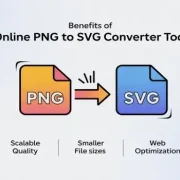
A PNG to SVG File Converter converts pixel-based images into vector paths, making them infinitely scalable and easier to edit. This single step eliminates many downstream design problems.
Here’s how it saves time:
1. One Asset, Multiple Uses of PNG to SVG File Converter
SVG files work at any size. Designers no longer need separate versions for web, mobile, and print.
2. Faster Edits
SVG files allow direct editing of shapes, colors, and strokes. Simple changes no longer require redesigning from scratch.
3. Fewer Revisions
Because SVGs maintain quality at all sizes, clients are less likely to request fixes for blurry or distorted visuals.
4. Cleaner Collaboration
SVG files integrate well into design systems and developer workflows, reducing back-and-forth adjustments.
Using a PNG to SVG Converter Online early in the process leads to smoother project execution.
Time-Saving Benefits Across Design Use Cases
Logo Design
Logos often start as PNG files. Converting them to SVG allows designers to reuse the same logo everywhere without resizing issues. This saves hours over the life of a brand.
UI and Icon Design
SVG icons scale cleanly across screen sizes. Designers can maintain a single icon library instead of managing multiple resolutions.
Marketing Graphics
Campaign visuals frequently change dimensions. SVG conversion allows quick resizing without quality checks.
Print Projects
SVG files eliminate the need to recreate assets for large-format printing, saving both time and effort.
A PNG to SVG Converter helps designers focus on creativity rather than technical fixes.
When Designers Should Prioritize PNG to SVG Conversion
PNG to SVG conversion is especially useful when:
- Assets are reused across multiple platforms
- Designs include text, icons, or simple illustrations
- Speed and scalability are critical
- Consistency across teams is required
However, highly detailed photographs may not benefit from SVG conversion. Designers should use conversion selectively for maximum efficiency.
Conclusion
Time is one of a designer’s most valuable resources. Reworking assets, fixing quality issues, and managing multiple file versions slows down even the most efficient workflows. A PNG to SVG Converter removes these friction points by turning static images into flexible, reusable design assets.
By adopting vector conversion early, designers gain speed, consistency, and creative freedom.
CTA: Convert your PNG assets to SVG today and spend less time fixing files—and more time designing.
FAQs
1. Does converting PNG to SVG really save time?
Yes. SVG files reduce resizing, re-exporting, and quality fixes, which significantly cuts repetitive work.
2. Are SVG files easier to edit than PNG?
Yes. SVG files allow direct editing of shapes and colors without losing quality.
3. Can SVG files be shared with developers easily?
Yes. SVG files integrate well with modern development workflows and responsive design systems.









Comments